Phonebook sources
Phonebook sources
The NethVoice phonebook is a centralized directory that stores and manages contact information for users and organizations. It enables seamless name and number resolution for incoming and outgoing calls, ensuring that caller details are consistently available across NethVoice CTI and NethVoice App. The phonebook can aggregate contacts from various sources, including external databases and CSV files, providing a unified and easily accessible address book for all users.
How phonebook sources interact with CTI permissions
Contacts imported from Address Book Sources are added to the centralized phonebook and are available for search and name resolution in NethVoice CTI and NethVoice App.
- Users with address book access can search and view these imported contacts.
- Imported contacts remain read-only in NethVoice CTI, even when the user has the maximum phonebook permission level.
- Create, edit, delete, and sharing actions in NethVoice CTI apply only to CTI contacts created by users.
- Phonebook permission levels configured in user profiles control what users can do with CTI contacts, not with records imported from external sources. For profile-level details, see Address Book permissions.
- Group sharing of contacts created in NethVoice CTI is available only with
Manage private and shared contacts. The selectable groups come from the user's Presence Panel group permissions and group membership; if the Presence Panelall_groupspermission is enabled, all operator groups are available. - Imported contacts have their own visibility, chosen by the administrator on the source itself: see Sharing options.
Adding External Address Books
Address book sources are configured in the NethVoice administration interface, from the menu Applications -> Address Book Sources. There you can define an external source for the contacts NethVoice should use to resolve incoming and outgoing calls.
These contacts will be added to the NethVoice address book and made available for use in NethVoice CTI and NethVoice App.
This configuration is not available inside NethVoice CTI: only an administrator can create address book sources, from the NethVoice administration interface.
To configure a new source, three steps are required:
- Source: Configure access to the source database of contacts.
- Mapping: Associate fields from the source database with those of the NethVoice address book.
- Settings: Choose who can see the imported contacts and, for recurring sources, the synchronization interval.
Phonebook Source
The available Source Type values are:
| Source type | Destination | Behaviour |
|---|---|---|
MySQL | Centralized phonebook | Recurring synchronization from an external database |
MS SQL Server | Centralized phonebook | Recurring synchronization from an external Microsoft SQL Server database |
CSV | Centralized phonebook | Recurring synchronization from a CSV file |
CSV (CTI phonebook) | Personal address book of a CTI user | One-shot import, no synchronization |
Infinity Zucchetti | Centralized phonebook | Recurring synchronization through the Zucchetti Infinity APIs |
For sources that feed the centralized phonebook, a unique Phonebook Name must be assigned to distinguish the origin of the contacts imported into the NethVoice phonebook. The CSV (CTI phonebook) source does not require it, since imported contacts belong to a user and not to a centralized source.
Based on the Source Type, additional attributes need to be specified:
MySQL
Database name, server address/port, username, and password for the source database are required.
Additionally, in the Select query text area, the SQL query used to retrieve data to be imported into the centralized address book must be inserted. If present in the text area, replace the word [table] with the name of the source table.
MS SQL Server
Same fields as a MySQL source: database name, server address/port (1433 by default), username, password and the select query.
The connection is established over TCP with the FreeTDS ODBC driver, so the SQL Server instance must accept TCP/IP connections on the configured port. A named instance cannot be addressed as server\instance: use the address and the TCP port the instance listens on.
CSV
In the URL field, you can specify the web address of a file in CSV format (Comma-Separated Values, values separated by commas and double quotes "" as text qualifiers, mandatory if the field contains a comma or space). Addresses starting with http:// and https:// are accepted.
Alternatively, you can upload a CSV file via the button to the right of the same text field. In this case, the URL field will be automatically populated.
The CSV file must be encoded in UTF-8 and contain column names on the first row.
The Verify button allows you to preview the data retrieved from the source.
CSV (CTI phonebook)
This source type uses the same CSV file format described above, but the contacts are imported once into the personal address book of a single CTI user instead of the centralized phonebook. No recurring source is stored and no synchronization interval is available.
The import is started by the administrator from Applications -> Address Book Sources -> New address book source, selecting CSV (CTI phonebook) as Source Type. Users cannot import a CSV from NethVoice CTI: after the import, they only find the contacts in their own address book, where they can manage them as if they had created them.
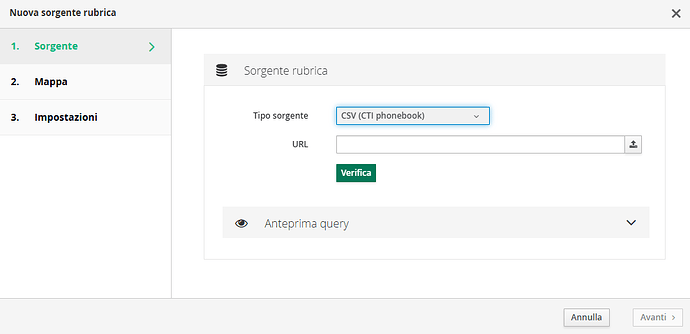
Two additional settings are required:
- Owner: the CTI user the contacts are assigned to. Only configured users (users with an extension) can be selected, and the field is mandatory.
- Sharing options: the visibility applied to every imported contact, see Sharing options.
The owner_id destination field cannot be mapped for CSV sources, because the owner is chosen explicitly.
At the end of the import, the result is reported as the number of Imported, Skipped and Failed rows. Rows without a value in the field mapped to name are skipped, and a malformed row does not abort the whole import.
Infinity Zucchetti
Populates the centralized phonebook through the Zucchetti Infinity APIs. Only the API endpoint URL, Username and Password provided by Zucchetti are required: the field mapping is fixed and applied by the importer, so the Mapping step only shows it in read-only mode.
| Infinity source field | NethVoice phonebook field |
|---|---|
| Name | name |
| Company | company |
| Mobile phone | cellphone |
| Work phone | workphone |
| Home phone | homephone |
| Fax | fax |
| Work email | workemail |
| Home email | homeemail |
| Address | workstreet |
| Office | title |
| Office / status / id | notes |
Sharing options
For every source you can choose who can see the imported contacts:
- Public: the contacts are visible to all users that can access the address book. This is the default and it matches the behaviour of sources configured before this option was introduced.
- Groups: the contacts are visible only to the members of the selected groups. At least one group must be selected.
The selectable groups are the CTI groups configured in Configurations -> Users. If none of the selected groups exists any more (for example because it was renamed or deleted), the source is rejected instead of being silently made public.
Custom Name Resolution
If you wish to use a source other than the centralized address book to resolve names, you can create a custom resolution script and place it in the ~/.local/share/containers/storage/volumes/lookup.d/_data/ directory.
In the Github repository, there are two example scripts: lookup_dummy.php and lookup_vte.php, which can serve as a starting point for creating your own custom script.
The lookup_dummy.php script returns a fake result for any number dialed or incoming call, while the lookup_vte.php script utilizes an external API.
| Field | Description |
|---|---|
| owner_id | Owner of the contact |
| homeemail | Home email address |
| workemail | Work email address |
| homephone | Home phone number |
| workphone | Work phone number |
| cellphone | Cell phone number |
| fax | Fax number |
| title | Job title |
| company | Company |
| notes | Notes |
| name | First and last name |
| homestreet | Home address |
| homepob | Home PO Box |
| homecity | Home city |
| homeprovince | Home province |
| homepostalcode | Home postal code |
| homecountry | Home country/region |
| workstreet | Work address |
| workpob | Work PO Box |
| workcity | Work city |
| workprovince | Work province |
| workpostalcode | Work postal code |
| workcountry | Work country/region |
| url | Website address |
| firstname | First name |
| lastname | Last name |
| job | Job |
| workphone2 | Secondary business telephone number |
| cellphone2 | Secondary mobile number |
| otherphone | Other telephone number |
| otheremail | Other email address |
| Facebook profile | |
| Instagram profile | |
| LinkedIn profile |
The name field is still the one used for call name resolution: firstname and lastname are additional fields, shown and editable in NethVoice CTI.
The source name is no longer a mappable destination field: it is set once in the Phonebook Name field of the source.
Settings
Recurring sources (MySQL, MS SQL Server, CSV, Infinity Zucchetti) synchronize contacts on a schedule. The CSV (CTI phonebook) source is a one-shot import and has no synchronization settings.
You can choose the synchronization interval for contacts between:
- 15 minutes
- 30 minutes
- 1 hour
- 6 hours
- 24 hours
Once the source is created, you can:
- Immediately synchronize using the
Syncbutton - Enable/disable synchronization